Lab Journal - Intro
I did a poll a while ago about what people would like to see when I eventually started writing posts here, and honestly I did not expect the answer to be my homelab but here we are. Because at this point it’s too big to cover in just one post, I’m going to introduce it a bit here and I’ll be expanding on it in different posts as I work on different components.
The Basic Setup
My lab is split up into two main parts; Sol and Spectre. There’s Sol, which is the internal locally hosted network, managed by an OPNSense VM. And there’s Spectre, which is a VPS connected to the lab and hosts most of my internet-facing services.
Sol is made up of locally hosted servers:
- aura (NixOS)
- echo (Proxmox)
- phantom (Proxmox)
- pulse (Proxmox)
And Spectre is just one VM in the cloud:
- spectre (NixOS)
I only recently set up OPNSense, so it’s not too complex at the moment and all my Proxmox hosts along with Aura are on the same network. Some of my older VMs are also here, but will slowly be moved off into VLANs managed by OPNSense for security. My OPNSense VM connects to my home LAN, which it sees as the WAN, and it’s set up as the DMZ on my home router. This means it integrates pretty seamlessly with the home network and I don’t upset anyone when things in the lab break. As much as possible I avoid NATing, which means I can access anything in the lab from the wider home LAN without issue (firewall permitting). Internally, OPNSense functions as a DHCP server for the main management network of the lab and routes between VLANs. It has routes set up for NetBird, the VPN service I host on Spectre and use for remote access to the lab.
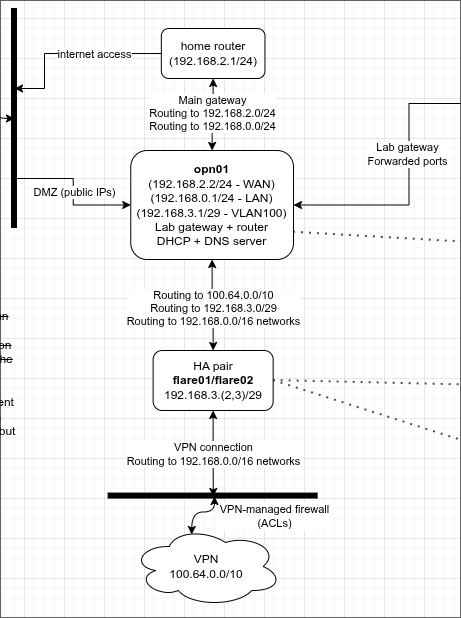
An excerpt from the diagram I keep for documentation
At the moment, most public-facing services are hosted directly on Spectre. This includes my VPN, Keycloak (IdP), Joplin (markdown notes), and many more. I also have a WireGuard tunnel connecting this to Aura, which allows me to proxy web services hosted on my LAN when I need to. Aura hosts most of the important internal and heavier external services, like a Minecraft server and Home Assistant. VMs cover essentially everything else and a lot of Aura’s network management functionality is being replaced by OPNSense, but I’ll give a shoutout to my Windows VM in particular because it’s very handy to have whenever I need to use Windows-only software.
Over time I’ll explain more about what each part does and where it fits in, but that’s an overview of the general structure.
A Brief History
Aura was how the lab started, as a Ubuntu machine that hosted a Minecraft server and over time a few more services. I started using Spectre (just named ‘Aurillium Remote’ at the time) in early 2022 which allowed me to host websites, as this was effectively blocked by my home ISP. Over this year I gained a lot more experience with Nginx and Docker and had most of my services set up with Docker Compose.
The lab gradually expanded in terms of what I hosted from 2022-2024, but it was getting cumbersome to manage the various services I had. Some were installed locally and some were hosted in Docker, and a lot had similar configuration options that had to be changed in a few places at once. NixOS was my solution to this. In late 2024 I moved my local Ubuntu install to NixOS and named it Aura, in 2025 I did the same thing to what then became Spectre.
I got Echo at the beginning of 2025, which is when things started growing more rapidly. This was when I decided to try Proxmox for the first time to set up an Active Directory test lab. Echo is essentially a carbon copy of Aura’s specs but with PVE installed instead. Not long later, I got Phantom and set the two up in a cluster.
I set up a WireGuard tunnel between Aura and Spectre so I could use it to proxy heavier HTTP-based services and access some of my VMs through Spectre. Some long-term and infrequently accessed file storage could be offloaded to Aura and a small NAS I recently got too, as Spectre is a fairly minimal VPS and I don’t really want to spend more money than I have to there.
NetBird became my remote access solution as I wanted to harden the setup and doing everything directly through SSH wasn’t particularly smart, and just wasn’t viable when I needed anything with better performance than SSH tunnelling.
Keycloak was installed at the same time and kind of as a dependency for NetBird, but this was the beginning of a much larger project that involved me securing my lab a lot further and moving as much as possible to Keycloak’s SSO.
I got Pulse later in 2025, which was set up with PVE and added to the cluster (now authenticated via Keycloak). By far the newest and by my guesses the most stable too, I chose this host to set up OPNSense. Later on, when my NetBird routing node on Aura failed, I set up a routing node on Pulse, then another on Echo that could be enabled in case there were issues with the original.
I’ve also recently modified my Minecraft servers to sit behind a Velocity proxy with different authentication methods depending on whether it’s accessed from inside or outside the lab.
As of now, Spectre runs:
- Joplin
- A Discord bot
- Tandoor Recipes
- (Temporarily) a PR of Aperisolve until it gets released on the official site
- Keycloak
- NetBird management server (including relay and coturn)
- A Matrix instance
- Outline wiki
- Vikunja
- And a few more less used services / support and backup services for the others
At this point there are at least a few VMs set up on all three PVE hosts, not all in active use but several quite important to the lab. This includes:
- A FreeIPA server for directory services
- A Squid proxy for HTTP/HTTPS traffic in my FreeIPA domain
- Windows XP (for fun)
Honourable mentions to:
- robert (Raspberry Pi 3)
- vera (Raspberry Pi 4, 4GB)
- lucyn (Raspberry Pi 4, 8GB)
- Unnamed Ubuntu installation which became Aura
- Aurillium Remote (VPS Debian installation) which became Spectre
My Raspberry Pis especially were pretty heavily used before I started building my actual lab; possibly in future I’ll document how I was able to run a Minecraft server supporting ~10 players on my Raspberry Pi 4 and how we optimised it, and see if it’s still feasible today.
But that’s the current setup and a bit of a history, I hope you enjoyed! Come back next time as I document my NetBird routing nodes that allow me to access my lab from anywhere.